4.6.44

4.6.44

We refined how custom typography works in the Visual Designer. When you picked a Google Font for your visuals, only a single weight came through, so any heading or label set to bold, light, or anything other than that one weight quietly fell back to the wrong style. Designing a clean lower-third or title card meant fighting the font instead of using it.

This release fixes that at the source: selecting a Google Font now pulls in every weight and style that font offers, so your visuals render exactly as designed. Alongside it, we tidied up the studio server overview, hardened the Playout rundown, and smoothed over a few rough edges across the app.

New

  • Clips: Added a zoom-to-selection action so you can instantly frame the part of the timeline you're working on.

Improvements

  • Studio: The server instances overview now shows which clients were recently active, giving you clearer insight into what's running.

  • Studio: Refined the server instances list and header for a cleaner, more consistent layout.

  • Studio: The server dropdown now docks neatly next to its label on mobile, with a more compact view toggle and check-for-updates tucked into the dropdown.

Fixes

  • Visual Designer: Google Fonts now load in every available weight and style, so visuals render exactly as designed instead of falling back to a single weight.

  • Visual Designer: Custom font uploads are now reliable, with the station's font storage prepared automatically during upload.

  • Studio: The app now recovers on its own after an update instead of showing a blank screen.

  • Playout: Fixed rundown items being dropped when saving an episode.

  • Playout: Rapidly clicking Create Episode Rundown no longer risks creating duplicate rundowns.

  • Clips: Fixed large clip exports failing to complete.

  • Output Variables: External data source lists no longer error out when a station is missing.

4.6.43

4.6.43

We expanded how you keep an eye on the broadcast across the platform. The server-instance overview gained a list view so you can scan many machines at once, Clips exports now handle the largest recordings without hitting a ceiling, and Studio recordings have new cleanup tools to keep storage tidy between productions.

Several smaller refinements land alongside these — including smoother handling of stale page loads after an update, a steadier Episode Composer, and tighter behaviour on the recording cards in the Clips library.

New

  • Studio: Added a list view to the server-instance client overview, making it easier to scan many connected machines at a glance.

  • Studio: Restyled the server-instance views with the new control design system, including refined tables, dropdowns, and dialogs.

  • Clips: Added tools to clean up duplicate Studio recordings, keeping the library tidy between productions.

Improvements

  • Clips: Raised the maximum file size for Clips exports to 50GB, so long recordings can be exported in a single pass.

  • Clips: Sped up the exports list by loading export details only when needed.

  • Clips: Recording card titles now wrap to two lines and use a tighter font size, so long file names stay readable.

Fixes

  • Clips: Fixed a crash when opening exports that belonged to a deleted project.

  • Playout: Fixed a crash when opening the Episode Composer in certain rundowns.

  • Playout: Prevented duplicate Episode Rundowns when the Create button was clicked rapidly.

  • Studio: The app now reloads itself automatically after an update, instead of showing a blank page when an older tab is left open.

4.6.39

4.6.39

We enhanced how you organize Station Variables. While station variables have always lived in a single flat list, larger productions could quickly accumulate dozens of variables, making the right one harder to find. Now you can group station variables into named groups, keeping related variables together.

New

  • Output Variables: Added Variable Groups, allowing station variables to be organized into named groups

  • Output Variables: API data source test requests now auto-detect the response format (JSON, XML, RSS, CSV).

  • Clips: Added context menu to recording, project, and export cards in the recordings page

Improvements

  • Media Hub: Redesigned source filtering

  • Media Hub: File changes now sync across open browser tabs automatically

  • Output Variables: Variable groups can be edited and reordered directly from the Variable Controller

  • Visual Designer: Code Editor side panel can now be resized when pinned

  • Output Editor: License limit on outputs now shows a disabled button with tooltip instead of a persistent alert

Fixes

  • Settings: Station switcher icon is now correctly centered when the sidebar is collapsed

  • Output Variables: Variables linked to a deleted API data source now display a warning badge

4.6.38

4.6.38

This release rounds out the recent Studio and Media Hub updates with a focused set of refinements and stability fixes. HyperDeck connections now let you pick the recording codec directly in their connection settings, so capture quality is configured where the rest of the connection lives instead of relying on device defaults.

New

  • Media Server: Added a recording codec selector to HyperDeck connection settings

Improvements

  • Media Hub: Added vertical scrolling to the media selector dialog so longer lists stay reachable

Fixes

  • Visual Designer: Fixed stack border rendering

  • Visual Designer: Fixed empty values breaking the border radius setting

  • Visual Designer: Resolved a drag-to-scroll crash on touch devices

  • Visual Designer: Cancelling the color eyedropper no longer triggers an error

  • Automations: Fixed now-playing text truncation that could hide the dropdown in Automation Link settings

  • Playout: Fixed program selection handling when switching between programs

  • Clips: Fixed ingest source badge rendering

  • Media Hub: Fixed a header issue affecting media uploads

  • Studio: The server status refresh button now shows a loading state to prevent repeated clicks

4.6.35

4.6.35

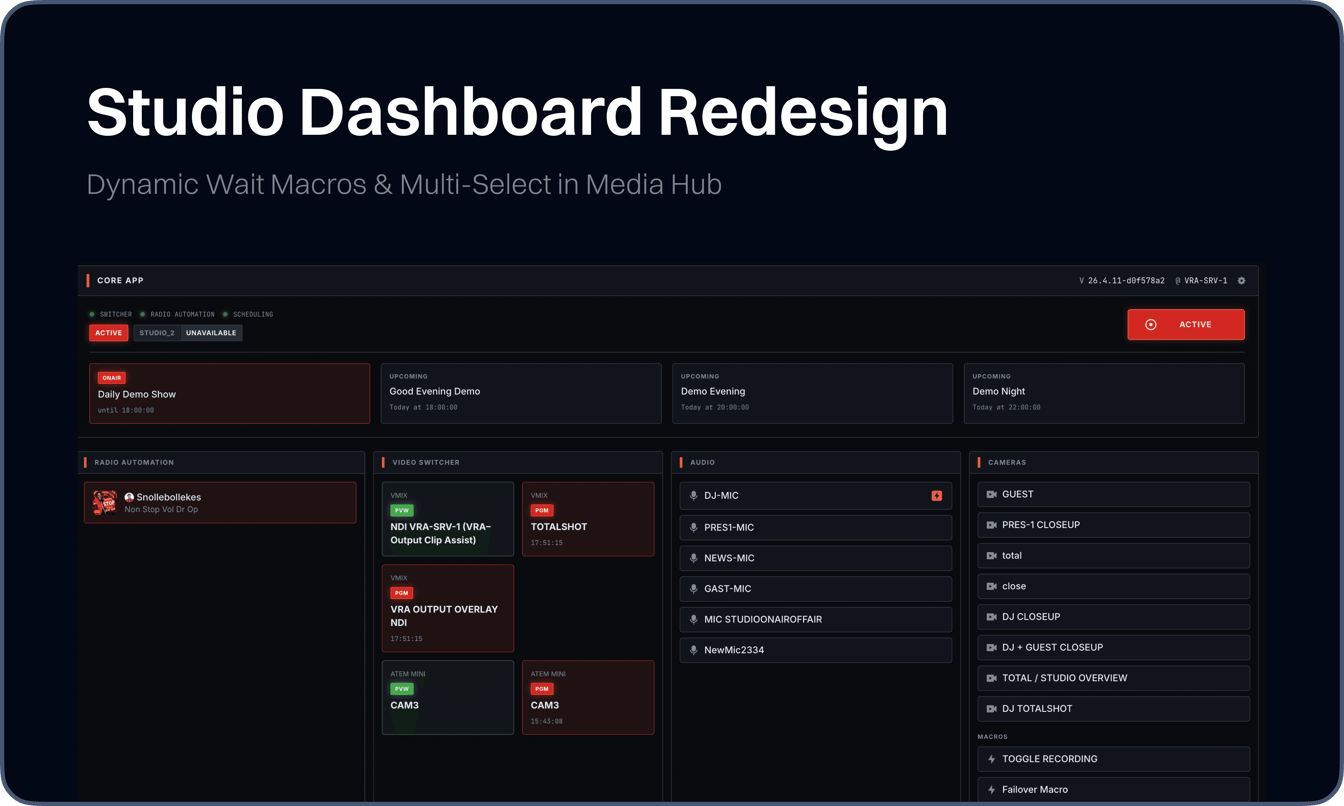
We redesigned the Studio dashboard and overview to give you a clearer read on what's happening in the room. While the previous layout treated every panel with equal weight, picking out the active production and the state of connected gear often meant scanning across several cards. Now the dashboard leads with what's running, and the overview groups related information so the things you check most are the things you see first.

Alongside the redesign, the Media Hub now supports multi-select for acting on several items in one go, and the Macro editor gains a Dynamic Wait step for runtime-driven delays - turning two repetitive workflows into single, deliberate actions.

New

  • Studio: Redesigned Studio dashboard and overview with a refreshed layout and clearer information hierarchy

  • Media Hub: Added multi-select for selecting and acting on multiple media items at once

  • Macros: Added Dynamic Wait step to the Macro editor for random delays between Macro Items, falling in a configured range

  • Settings: Added Settings Overview page providing a visual entry point to every configuration area

  • Settings: Added dedicated Clips section, separating clip configuration from Media Server settings

  • Visual Designer: Added search to the Layer Catalog for finding the right layer type without scrolling

  • Visual Designer: Added context menu on the canvas for faster layer actions

  • Media Server: Added Auto Create Pattern support for ingest sources, enabling automatic media creation based on configured naming patterns

Improvements

  • Automations: Refined the Automation Link, Studio Automations- and Camera- settings pages with a cleaner connections UI

Fixes

  • Media Hub: Upload file drop state now clears instantly on drop, instead of freezing during upload

  • Visual Designer: Fixed Padding and Fixed Radius now sync live across all sides on the canvas

  • Media Server: Resolved error in HyperDeck State Overview when active_media was undefined

  • Media Server: HyperDeck connections now use the timeline source for accurate timecode readings

  • Clips: Stabilized playhead behavior

  • Switcher: Fixed switcher label rendering

  • Settings: Unified SidebarFooter padding for visual consistency

  • Settings: Fixed dialog width handling

  • Studio: Resolved several mobile rendering issues

  • Dashboards: Resolved styling issue in core display

4.6.32

4.6.32

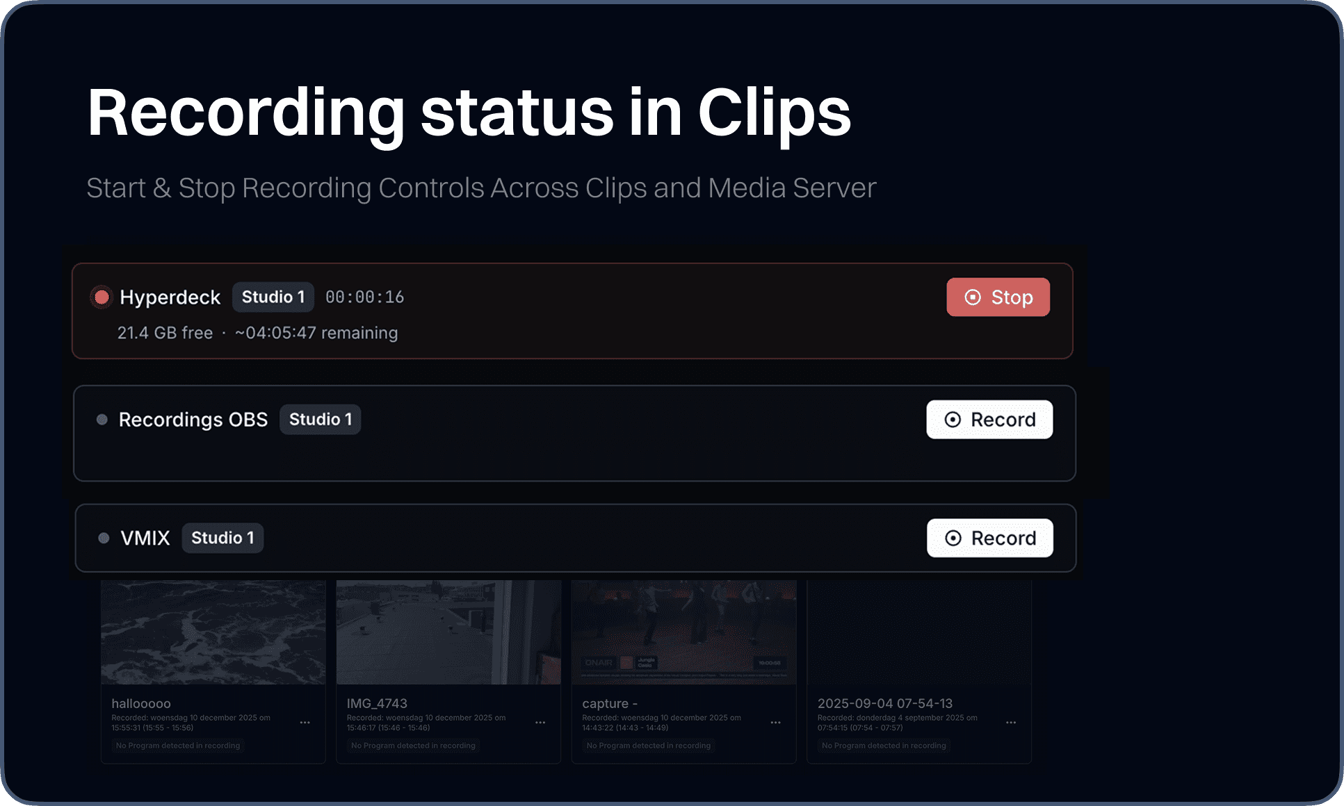
We brought recording controls directly into Visual Radio Assist. Previously, starting or stopping a studio recording meant leaving the platform entirely - you had to trigger it on the HyperDeck itself, through vMix, or whichever capture tool was running behind the scenes. Now you can manage recordings from inside the Media Server Settings and Clips interface, without ever switching to an external device or app.

This update brings recording management into the same workflow you're already using to run your broadcast. Instead of juggling hardware panels and third-party software to start or stop a recording, the controls live alongside the clips and media server interfaces.

New

  • Media Server: Added start and stop recording controls to the media server settings Make sure to upgrade your Media Server application to the latest version to activate this functionality.

  • Clips: Added start and stop recording logic to the recordings overview

  • Dashboards: Newly styled UI dashboard buttons

  • Output Player: Added loading state on items in Output Player Settings Config

  • Settings: Overview page with shortcuts to every individual setting page

Fixes

  • Studio: Fixed archive recording not refetching the paginated list

  • Studio: Fixed dialog width issue affecting Broadcaster on mobile devices

  • Clips: Fixed responsive layout of the latest project card

  • Dashboard: Custom dashboard wouldn’t show up

  • Scheduling: Fixed scheduling program not clearing when creating a new event

  • Media Hub: Fixed cancel action for raw file deletion

  • Dashboards: Resolved styling issue in core display

4.6.29

4.6.29

We added a Bin to the Media Hub, bringing soft-delete functionality to your media workflow. Previously, deleting a media item or folder was permanent and irreversible. Now, deleted items are moved to a bin first, where you can review, restore, or permanently remove them. They’ll be automatically removed after 7 days.

This update gives you a safety net when managing media. You can drag items to the bin, browse archived folders, and restore anything that was removed by mistake. Folders and their contents can be archived and restored as a whole, keeping your library organized without the risk of accidental data loss.

New

  • Media Hub: Added Bin with recovery support for media items and folders, replacing permanent deletion

  • Visual Designer: Added "Preview All Items" toggle on Iterator and Playlist layers, allowing you to cycle through all items directly in the designer

  • Media Hub: Added multi-file drag and drop upload to the Media Hub dialog

  • Clips: Added media ingest source name display in clips projects information tab

  • Media Server Connection: Added timestamp_format configuration option for HyperDeck setups to specify how we have to interpet the timestamp that is saved in the Hyperdeck data.

Improvements

  • General: Dates across the platform now display as relative timestamps with full datetime on hover

  • General: Today and yesterday labels added for clearer temporal context

  • Settings: Added interactive token selector and live preview for recording name format configuration in Media Ingest Source settings

  • Output Player: Player tooltips now display last updated time instead of launch time

  • Media Hub: Refined HyperDeck state overview with updated layout and readability

  • Media Hub: Raw file uploads now show progress tracking in the upload manager

  • Audio Manager: Replaced basic select with a searchable combobox in Audio Manager setup

  • Clips: Ingest source name now displayed in project info with direct link to settings

  • Visual Designer: Added "preview all items" option across all iterator layer types

Fixes

  • General: Fixed loading bug when going back from settings to app

  • General: Fixed relative time incorrectly showing for future dates

  • Media Hub: Fixed conditional checks and template logic in Media Connection Sheet

  • Clips: Fixed responsive layout on project cards

  • Clips: Fixed zoom button behavior in the clips project timeline

  • Visual Designer: Resolved style inconsistencies in Visual Layer components

  • Visual Designer: Fixed handling of missing media assets in Bodymovin animation layers


4.6.24

4.6.24

APP UPDATE REQUIRED

Update your local clients (Core, Audio Manager and Output Player) to enjoy the latest features of VRA.

To make sure the locally installed applications of Visual Radio Assist can securely communicate over HTTPS you need to install the latest valid VRA certificate bundle to your certificate store.

In the latest version of the Core, version 4.5.12 , this bundle is automatically installed on startup. It is highly advised to install this renewed certificate to facilitate fast and stable local communication. For more information about the local app communication check the docs: https://docs.visualradioassist.live/advanced-installation/direct-local-bus-api-ssl-connection. Make sure to also update the other apps to the latest versions.

Latest bundle zip: https://assets.visualradio.cloud/local-apps/configuration/vra-local-cert-bundle.zip

New Media Connection control for OBS and vMix

We expanded Visual Radio Assist with a dedicated Media Connection interface for managing OBS and vMix integrations. While media server connections existed before, configuring and monitoring them required navigating through settings. Now, both OBS and vMix connections can be set up, monitored, and controlled from a unified interface with real-time state overviews, recording status, and timecodes.

Alongside this, we added timeline zooming to the Clips editor with intelligent scroll behavior that follows the playhead, and introduced station-wide event broadcasting for dashboard actions.

New

  • Media Server: Added OBS media connection UI with dynamic port selection, default naming, and real-time state overview including recording and streaming status

  • Media Server: Added vMix connection UI with active status indicators and state monitoring

  • Dashboards: Added station-wide event broadcasting with "Station Wide Action" toggle in Dashboard Designer

  • Clips: Added file size display and creation datetime directly on export cards

Improvements

  • Dashboards: Added fullscreen exit button to Dashboard components

  • Clips: Refined moment selection logic with minimum duration filter and adjusted gap thresholds

  • Clips: Added timeline zooming with scroll behavior based on playhead position settings

  • Clips: Optimized event handling and event pairing in clips data store

  • Output Editor: Improved media selector dialog layout with media server connection alerts

Fixes

  • Clips: Fixed Firefox rendering bug in mapping matrix by reorganizing render logic

  • Playout: Fixed release commando value validation before save

  • Visual Designer: Fixed tainted canvas issue on thumbnail export

  • Clips: Fixed external project deletion to only affect current project

  • Commando’s: Fix display logic for RECALL preset in CommandoChip component

4.6.20

4.6.20

We optimized the Clips experience with faster timeline rendering and a more responsive editing workflow. The timeline now handles large recordings more efficiently with an updated thumbnail system, and loading states provide clearer feedback when working with events and projects. These changes make navigating and editing your recordings noticeably smoother.

Additionally, we updated the Media Connection Sheet with a refined design and an improved empty state for HyperDeck devices, making it easier to identify and manage your media connections at a glance.

Improvements

  • Clips: Performance improvements for timeline and thumbnail rendering

  • Clips: Added NEW badge on recording cards created within the last 20 minutes

  • Output Player: Enhanced conditional rendering for SDI devices and video format display

  • Switcher: Streamlined input state handling for switchers in active studio

  • Studio: Updated hierarchy and input consistency across the app

  • Settings: Enhanced settings configuration and page title handling

  • Clips: Refined thumbnail selection logic and preserved aspect ratio in encoder settings

  • Clips: Scheduling Programs Event Filtering: Refined the timestamp query logic for scheduling programs, resulting in more accurate event filtering when retrieving scheduled content.

Fixes

  • Output Variables: Fixed clearing when creating a new Options Variable

  • Output Variables: Added auto-generated slug for option references

  • Output Variables: Added auto-focus on next option when creating one

  • Output Variables: Disabled variable creation when no options are defined

  • Playout: Fixed issue where adding a new item would result in an unique error

  • Playout: Fixed audio trigger events being incorrectly processed in event handling

  • Output Player: Fixed alert text color for license error messages

  • Studio: Fixed undefined errors in state handling across dashboard and macro components

  • Media Hub: Fixed active disk detection using device index and simplified NAS bookmark handling

  • Macros: Resolved activeMacroItemIndex reset handling

  • Clips: Added cleanup scheduler to remove old recordings on an hourly timer

  • Core/ATEM:


4.6.11

4.6.11

APP UPDATE REQUIRED

Update your local clients (Core, Audio Manager and Output Player) to enjoy the latest features of VRA.

We added Media Connections, a new way to integrate your recording devices directly with VRA. Whether you're using a HyperDeck, vMix, OBS, or NAS storage - you can now connect these devices to VRA and automatically pull in your recordings as clips.

For example, when vMix or OBS finishes a recording, or when a HyperDeck writes a file, VRA picks it up through the configured media connection. The same applies for NAS-based workflows - connect your network storage and access your recordings directly from within VRA. Scheduling sync ensures recordings from OBS and vMix align with your broadcast schedule automatically.

New

  • Media Server: Added Media Connections for integrating recording devices (HyperDeck, vMix, OBS, NAS) directly with VRA to automatically import clips

  • Output Player: Added base layer content visual support in outputs and clips recording

  • Settings: Added station switcher in account profile for multi-station management

  • Settings: Machine User tokens now have configurable expiry of max. 2 years

  • Switcher: Added ATEM scoped ME State Keyer condition support in Commando automation rules

  • Settings: Added station switcher in account profile for quick switching between stations

  • Global: Added cloud notices system for broadcasting platform-wide announcements to users

Improvements

  • General: Updated dark color theme with refined neutral tones across VRA

  • Studio: Redesigned server instance overview with updated device group ordering, machine group sizing, and a hardware-inspired component system for a consistent broadcast aesthetic

  • Media Server: Added auto-cleanup warnings and visual badges in media ingest settings to surface storage risk earlier

  • Media Server: Improved ingest source creation flow with clearer host input and streamlined connection setup

  • Automations: Added studio scoping so automation rules apply only within their configured studio context

  • Settings Studio Overview: Improved studio overview stability with better machine group ordering and sizing

Fixes

  • Audio Manager: Fixed audio trigger watcher bug causing incorrect state updates

  • Output Player Settings

  • Playout: Fixed state handling in processing state component

  • Audio Manager: Fixed bug where audio trigger watchers caused unintended behavior during state changes

  • Studio: Fixed placement and display issues in studio overview

  • Output Player: Fixed text size in rotated player tooltip and added overflow scrolling to active player sheet to prevent content clipping

  • Settings: Fixed role check with optional chaining in sidebar for safer access in edge cases

  • Studio: Fixed mobile sidebar state to close correctly on route navigation

  • Playout: Fixed race conditions in color and state updates

Apps

  • Core: ability to execute studio-scoped Automations

  • Core: execute ATEM-switcher scoped internal commando’s

  • Media Server: various updates to keep up with the latest features from Ingest Sources and Media Connections


4.6.0

4.6.0

Visual Radio Assist now offers a built-in video editing and export system designed for broadcasters who want to turn their studio recordings into social-ready content. With the new Clips feature, you can cut highlights, interviews, and standout moments directly from your recorded programs without handling large files or relying on separate editing software.

▶️ Clips feature walkthrough with Product Engineer Jochem Vogel

Introducing Clips

Recordings are stored locally and synced to the cloud via the Media Server, making them instantly accessible in the browser, without uploading or downloading. This eliminates the need to handle massive raw files, so you can go from hours of material to lightweight, ready-to-share clips in minutes.


Key Features:

  • Instant Availability: Access local recordings directly in the browser as soon as a broadcast ends. No upload, no download required.

  • Efficient Workflow: Create a 100 MB clip from a 40 GB recording without moving large files

  • Integrated Metadata: Use studio events and scheduling data to quickly find conversations, highlights, and key program moments

  • Interactive Timeline Tools: Frame-accurate editing with in/out points, cropping, and metadata markers

  • Edit Anywhere: Watch, edit, and export recordings without desktop software. Work from any device, including tablets, without needing to be in the studio

Coming Soon:

  • Live Recording Access: View and clip material while the recording is still running.

  • Advanced Editing Tools: Subtitle generation, and vertical graphic variants (if clean feed is recorded)

  • Direct Publishing: Share clips straight to social media without the hassle of sharing account credentials

  • Scoped Access for Editors and Presenters: Permissions can be assigned per program or studio, so editors or presenters only see recordings relevant to their shows, keeping workflows organized and secure

How to start using Clips

Upgrade the Media Server application to the latest version 4.6.0 which enables the Clips feature in your Cloud navigation. Configure your ingest sources and wait for your hours of recordings to be metadata ingested!

💡 Get in contact with us to try out Visual Radio Assist Clips with your current license, new licensing options will be published soon

New

  • Visual Designer: Saving a new visual now prompts for a name, preventing unnamed visuals from cluttering the library

  • Output Player: Added "Control Player" option to the player dropdown menu for quick access to the dedicated player controller

Improvements

  • Studio: Enhanced server instance graph stability with support for single-machine studio setups

  • Output Editor: File selector now accepts .mkv and .webm video formats

Fixes

  • Visual Designer: Fixed auto-height and text-sizing logic in text layers for correct rendering in graphics output

  • Playout: Fixed crash when loading archived rundown episodes


4.5.25

4.5.25

This release focuses on stability improvements across the Visual Designer and Scheduling modules. We’ve also addressed several critical fixes in layer handling, timezone processing, and transition timing.

New

  • Visual Designer: Added support for delay_enter and delay_leave properties on layer transitions and Bodymovin layers, enabling more precise animation timing control

  • Visual Designer: Added WebM video format support via Media Hub File upload for Video Media layers

  • Output Player and Media Server: metrics sharing and all new metrics interface

Improvements

  • Visual Designer: Updated transition logic with better fallback handling and promise resolution

  • Output Player: when a rundown is disabled the Player’ internal state is correctly cleared for the disabled rundown

  • Visual Designer: CSS rule cleanup when deleting layers

Fixes

  • Scheduling: Fixed critical timezone adjustment issues in calendar recurrence rules and date range handling

  • Visual Designer: Resolved layer visibility handling and sublayer visibility logic

  • Visual Designer: Fixed visual fixed duration handling for timed layers

  • Visual Designer: Resolved Bodymovin default image usage and animation handling

  • Output Player: Fixed critical playlist layer out-transition timing

  • Camera Angles: Fixed critical camera ID checks

  • Audio Manager: Fixed null checks and conditional interfaces for audio inputs and triggers

  • Media Server: Fixed availability detection when no media server is configured

  • Studio: Fixed live timer synchronization issue

  • Playout: Fixed drag delay behavior on composition items

  • Playout: Fixed rundown list reordering bug


4.5.20

4.5.20

Some users experienced performance issues with the scheduling calendar, particularly when working with recurring programs long time ago. In certain cases, the calendar could become slow or unresponsive, making it difficult to navigate and manage schedules effectively.

We've resolved the underlying issue and significantly improved how the calendar handles these schedules. The calendar is now fully stable, with optimized rendering that ensures smooth navigation even with complex recurring patterns. This update provides a much more reliable and efficient scheduling experience for everyone.

Separate Visual Render context

Previously the Visual Render engine was placed in the same context as the rest of the VRA Cloud platform, resulting in easy maintenance, hot bug fixing and quick release management. But due to the more stability requirements of the full Cloud platform we’ve started migrating of this structure in November 2025. Starting from the latest Cloud releases of December 22st all graphics rendering will take place in a separate context on visualradio.graphics.

This migration will further stabilize and split up the development of our graphics engine in the Cloud.

New

  • Scheduling: Added timezone support for improved international scheduling coordination

  • Studio Overview: Added right-click context menu functionality to node controls

  • Visual Designer: Added character limit and max length controls for long text input fields

  • Visual Designer: Added Fixed Size and Clip Content properties, replacing the need to manually set overflow: hidden and flex-shrink: 0 via Tailwind classes or Custom CSS

Improvements

  • Scheduling: Enhanced calendar performance with optimized rendering and sticky program headers for improved navigation

  • Scheduling: Resolved performance issues with recurring programs, particularly those created a few years ago

  • Server Core: Enhanced effective timestamp calculation for improved time synchronization

  • Variables: Refined form workflow for improved usability

  • Playout: Resolved archiving conflict that occurred when multiple rundown items were archived simultaneously

Fixes

  • Visual Designer: Fixed playlist layer initial delay binding behavior

  • Visual Designer: Fixed code editor initialization bug preventing proper component loading

  • Cloud: improved grace license period handling and license counting

  • Visual Designer: Fixed video media layer bug preventing designer loading

  • Output Player: Fixed reload server error when live player is not running

  • Output Variables: Fixed caching issue that occurred when adding or removing variables

  • Permissions: Fixed disabled state display for permission-restricted buttons

  • Automation Link: Fixed issue that occurred when no artist playing information was available

  • Playout: Fixed issue with reloading player when player instance was not loaded

  • Core: Fixed Program Host-based conditions in the Audio Triggers


4.5.8

4.5.8

We enhanced the Visual Designer's playlist functionality with individual item timing controls. While playlists previously cycled through items at a fixed interval, you can now set custom durations per item - giving you precise control over how long each element displays before transitioning.

This release also refines the server instance overview with improved device positioning and clearer visual hierarchy, making it easier to monitor your broadcast infrastructure at a glance.

New Playlist Layer custom timing

  • Added custom duration setting for individual playlist items, overrides playlist layer duration setting

  • Added Initial Delay for the playlist layer: delay before the first item is shown.

Improvements

  • Server Instances: Updated device positioning and client ordering in server instance overview

  • Server Instances: Updated lines display in studio overview

  • Visual Designer: Improved throttling for animation and text rendering updates

  • Output Variables: Added display mode preview for Option variable

Fixes

  • Visual Designer: Fixed border group icon rendering issue

  • Visual Designer: Fixed thumbnail visual image display on visuals with animations

  • Output Variables: Fixed station variable list feedback on creation and deletion

  • Audio Manager Triggers: Fixed audio manager count calculation

4.5.7

4.5.7

With custom fields on Scheduling Programs and Presenters you can customize the automated display of extra properties for onair and upcoming graphics. After adding and providing details on for example the Program custom “theme color” field, you can directly use the new “color” during automated graphics customization.

New

  • Scheduling: Added entity-based variable editor to program form for attaching custom variables to individual schedule entries

  • Media Hub: Added pagination to search results for handling large media libraries

Improvements

  • Visual Designer: Updated Bodymovin layer to support checkbox controls and nested text mapping structures

  • Visual Designer: Added validation checks for layer element handling preventing rendering issues

  • Settings: Added 'Reload Media Link' button to player settings for quick media source refresh

  • Scheduling: Enhanced variable editor to reset changes when navigating between program entries

  • Error Page: Improve error page after latest Cloudflare down time. Will help users in the future to see the issue.

  • Output Player: Reload Media Link manually from Output Player settings

Fixes

  • Playout: Fixed transparent colors on name tags

  • Playout: Fix cache issue when switching between the playout modes

  • Scheduling: Fix issue with selecting a start and end time on the same date.

  • Audio Manager: Added warnings for inactive audio device inputs

  • Dashboards: Fixed undefined object route error in dashboard viewer

  • Output Editor: Fix bug that freezes the page in the Standard Output Editor

  • Navigation: Fix bug that resulted in a freezing state after going back from settings to the app.

  • Visual Designer: Fix bug with duplicating visuals

  • Output Player & Media Server: Improved data update system

  • Audio Manager: Improved trigger history & condition state cleanup

  • Output Player: Manual mode improvements


stay in the loop

Subscribe to the latest updates on Visual Radio.

stay in the loop

Subscribe to the latest updates on Visual Radio.